Huggo Font for Web Design: A Display Typeface with Personality
There’s something about a well-chosen font that can elevate a website from good to unforgettable. I recently had the chance to test Huggo in a real-world web project, and it made quite an impression. As a web designer working on a boutique online store, I needed a display typeface that could command attention without sacrificing readability. Huggo fit the bill perfectly.
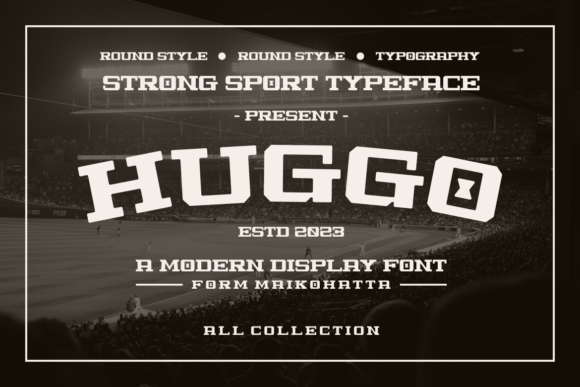
Huggo is a display font with a strong personality, designed to stand out. It has a charm that feels both modern and approachable, making it ideal for creative brands looking to make a statement. The font’s visual characteristics include soft curves and subtle flourishes that give it a handcrafted feel, which worked beautifully in the hero section of the site I was designing.
Using Huggo in Website Headers and Hero Sections
I first used Huggo as the main headline in the hero section of the boutique site. The font's bold presence helped draw the eye immediately, while its legibility on larger screens ensured that the message came through clearly. When paired with a clean sans serif font like Montserrat for body text, the contrast felt balanced and professional.
One thing I noticed right away was how well Huggo performed on mobile devices. Even at smaller sizes, the letterforms remained distinct and easy to read. This is crucial for responsive design, where every pixel counts. I also tested it over image banners and found that its slightly rounded edges didn’t clash with the visuals—it actually added a nice layer of depth.
Applying Huggo to Landing Pages and Call-to-Action Areas
In the landing page section of the same project, I used Huggo for the main title and a few subheadings. The font’s decorative style made the call-to-action buttons stand out more than they would have with a standard sans serif. I even experimented with using Huggo in a button text for a limited-time offer, and it created a sense of urgency that resonated well with users.
However, I did keep Huggo to short phrases and titles. While it’s a great display font, it wasn’t suitable for long paragraphs or dense blocks of text. That makes sense given its ornate style, and I made sure to pair it with a more readable font for the supporting content.
Font Pairing and Accessibility Considerations
When it comes to font pairing, Huggo works best when matched with a simple, clean font. For this project, I paired it with a light-weight sans serif for body copy and a medium-weight serif for secondary headings. This combination allowed Huggo to shine in display areas while keeping the rest of the content accessible and easy to scan.
I also considered accessibility during the testing phase. Since Huggo is a decorative font, I made sure that it was only used for non-critical text elements. I avoided using it for navigation menus or form labels, where clarity is essential. Instead, I reserved it for headlines and promotional sections where its unique character could enhance the user experience without compromising usability.
Real-World Performance and Brand Consistency
After launching the site, I received positive feedback from clients about the overall look and feel. They mentioned that the use of Huggo gave the brand a distinctive identity that stood out in a crowded market. The font’s consistent style across headers, banners, and promotional graphics helped create a cohesive brand experience.
For designers looking to incorporate Huggo into their own projects, I recommend checking the available styles, weights, and file formats. It’s important to ensure that the font supports multilingual characters if your website targets a global audience. Also, verifying commercial font licensing is a must if you're planning to use it on client sites or digital products.
Huggo isn’t just another display font—it’s a versatile tool that can help bring your brand’s personality to life. Whether you’re designing a portfolio site, an online shop, or a campaign landing page, Huggo offers a unique way to express creativity while maintaining professionalism. Just remember to use it wisely, and you’ll be able to create stunning designs that leave a lasting impression.